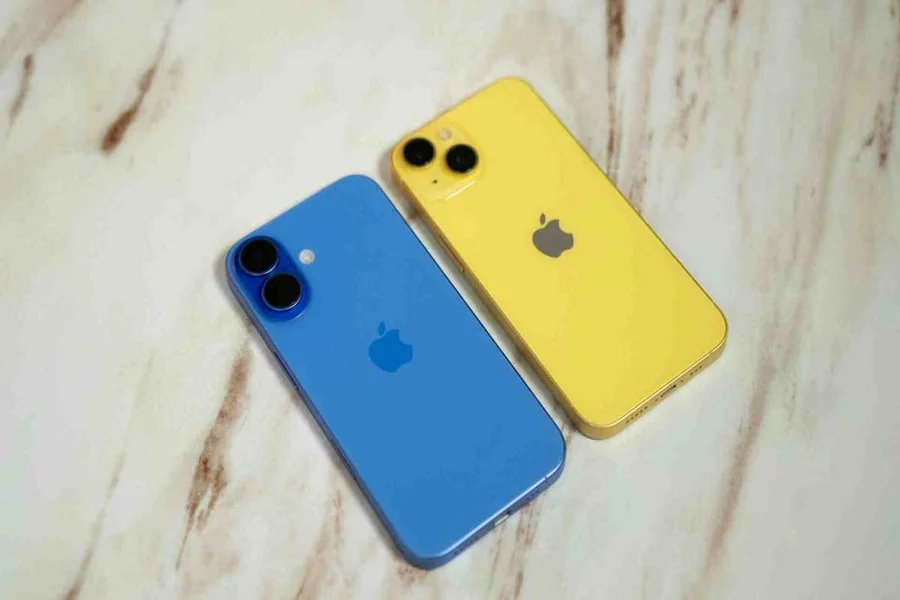
Before purchasing a refurbished device, What to Check Before Buying a Refurbished Device and it is important to understand what to expect so you can save money, but not compromise on quality. Devices like phones, laptops, tablets, smartwatches and electronics can be refurbished and are typically significantly less expensive than new devices. But the state or dependability of reconditioned goods can differ greatly from one supplier to another.
It is necessary to inspect, test, clean and repair (as needed) a properly refurbished device prior to re-sale. There are minor cosmetic marks with some devices. Others may have battery replacements, screen or internal component replacement.
This is a reason buyers should not only use the price as their main criteria.
Whether a refurbished device is indeed a good buy or not will depend on battery health, warranty coverage, return policy, physical condition, and even software support as well as the seller’s reputation.
Why Do People Buy Refurbished Devices?
The most typical answer is cost.
An updated mobile phone or laptop will be significantly cheaper than the same brand new. That can be particularly appealing when purchasing high-end gear from Apple, Samsung, Dell, Lenovo, HP and other big brands.
Other factors why people opt for refurbished electronics.
- Better value for money – Refurbisheds typically have a lower price tag.
- Accessibility to better quality models – Consumers can purchase a higher quality model with the same price.
- Less electronic waste – Devices can be reused to get more years of life out of them.
- Quality refurbishers test before resale – Good refurbishers test and inspect products before resale.
- Warranty Protection – Some refurbished products offer limited warranty protection.
The term refurbished does not necessarily imply that all products are made to the same standard.
That is where good care comes into play.
What to Check Before Buying a Refurbished Device
There are several important areas to inspect before spending your money.
| Feature | What to Check |
| Seller | Reputation and customer reviews |
| Warranty | Length and coverage |
| Return Policy | Number of days allowed |
| Battery | Health and remaining capacity |
| Screen | Scratches, dead pixels and touch response |
| Body | Dents, cracks and damaged ports |
| Storage | Correct storage capacity |
| Network | Carrier lock or compatibility |
| Software | Updates and security support |
| Accessories | Charger, cable and included items |
| Serial Number | Device identity and warranty status |
Checking these details helps reduce the risk of receiving a device that requires additional repairs shortly after purchase.
Check the Seller First
The seller is much more valuable than the device.
An electronica refurbished phone from a known manufacturer or a known marketplace retailer is likely to have more detailed testing processes than a marketplace seller who does not know the phone manufacturer.
Do some research on the seller’s reputation prior to purchasing.
Check for details on:
- Customer reviews
- Return policies
- Warranty claims
- Refurbishment standards
- Customer service
- Replacement policies
It’s important for a seller to make sure that they are fully aware of what is included in their refurbishment process.
The company might test the battery, display, cameras, microphones, speakers, charging port, Wi-Fi, buttons and physical buttons.
Do not deal with sellers who give few details on the condition of the product.
Understand What “Refurbished” Actually Means
Don’t assume that refurbished is synonymous with used.
The products are customer returns with little usage. Others might have been fixed due to a technical issue.
An updated device could have:
- A replaced battery
- A replaced display
- New internal components
- Cosmetic scratches
- Repaired charging port
- A new outer housing
- Some outlets employ condition grades as well.
For example:
Excellent could be that the cosmetic wear is not obvious.
Very Good could include minor scratches or marks.
There may be cosmetic damage to good but it should be able to function properly.
The comments should focus on how the product looks, not basic functionality. A device refurbished for any grade should still function properly as a device.
Check the Battery Health
One of the most significant checks you should make is the battery condition.
Rechargeable batteries deteriorate with age. A phone can appear flawless and yet the battery life is just a few hours.
For smart phones and tablets, if they are offered, make sure that the seller offers a minimum battery capacity guarantee.
If the battery retains about 80% or more of its original charge, it is likely to be suitable for a number of devices.
Battery health data is sometimes available in the battery section of the iPhone‘s settings.
If you have a laptop, the battery condition can be verified by the operating system or by the manufacturer’s diagnostic software.
If it has been several years, ask if the battery has been replaced.
Retrofitting batteries in the future may diminish your savings from the purchase of refurbished batteries.
Inspect the Screen Carefully
Displays are one of the most costly items to replace.
Look on the screen for:
- Cracks
- Deep scratches
- Dead pixels
- Screen discoloration
- Bright spots
- Touchscreen problems
- Flickering
If the price is commensurate with the condition of the car, then small cosmetic scratches may be okay.
However, functional screen issues are not the same.
A touchscreen that fails to respond sometimes can get extremely annoying.
The screen burn-in should also be tested for OLED devices. The icons or screens may leave slight traces even when other content is shown, due to burn-in.
Look at the Physical Condition
Look for problems in the whole device and not just the screen.
Inspect frame, back panel, keyboard, camera housing and slots.
Slight scratches are normal with refurbished devices.
Serious damage will suggest that there was a substantial impact.
Look for:
- Cracked casing
- Loose buttons
- Bent frames
- Damaged charging ports
- Missing screws
- Loose hinges
- Camera lens damage
For laptops, open and close the screen several times.
The hinges should glide as they go, and should not feel too loose or too stiff.
Test the Charging Port
Charging ports receive a lot of physical wear.
Connect the charger and make sure the device begins charging normally.
Move the connector slightly.
Charging should not repeatedly stop and start.
Also check whether fast charging works if the device originally supported it.
A damaged charging port can require professional repair, which may make a cheap refurbished device much less attractive.
Check Storage and Memory
Make sure the device actually has the specifications advertised by the seller.
Two phones may look identical while having completely different storage capacities.
For example, one version may include 128 GB of storage while another has 512 GB.
Laptops can also vary significantly in:
- RAM
- SSD capacity
- Processor
- Graphics
- Display resolution
Open the device settings and confirm the specifications.
Do not rely only on the label on the box.
Check Whether the Device Is Locked
This is especially important when buying refurbished smartphones.
Some devices may be locked to a specific mobile carrier.
If you plan to use another network, confirm that the phone is unlocked.
You should also check compatibility with your carrier’s network frequencies and technologies.
A phone designed for another country may work partially but lack support for certain network bands.
For international buyers, network compatibility should always be checked before purchasing.
Check the IMEI or Serial Number
Smartphones and many other electronics have unique identification numbers.
For phones, the IMEI can help identify the device.
The serial number can also be useful for checking warranty information and device details.
Compare the identification number shown in the operating system with the number printed on the device or packaging when possible.
For smartphones, you should also avoid devices that have been reported lost or stolen.
A blacklisted phone may not connect properly to mobile networks.
Make Sure Previous Accounts Are Removed
A refurbished device should not remain linked to the previous owner’s account.
For Apple devices, Activation Lock should be removed.
For Android devices, Factory Reset Protection should no longer be connected to another person’s Google account.
A properly refurbished phone should allow you to complete the setup process using your own account.
If the device asks for the previous owner’s password during setup, do not continue with the purchase.
Check the Cameras
Modern smartphones can contain several cameras.
Test all of them.
Open the camera application and switch between:
- Main camera
- Front camera
- Ultra-wide camera
- Telephoto camera
- Video mode
Check autofocus and image stabilization when supported.
Also inspect the camera lenses.
A scratched camera lens can affect image quality even when the camera itself works normally.
Test the Speakers and Microphone
Play music or a video through the speakers.
The sound should be reasonably clear without buzzing or distortion.
Then test the microphone.
Record a short voice message and play it back.
For smartphones, making a test call can help confirm that the microphone, earpiece and loudspeaker work properly.
These components can sometimes be overlooked during quick inspections.
Test Wi-Fi, Bluetooth and Mobile Data
Connectivity problems can be difficult and expensive to repair.
Connect the device to Wi-Fi.
Pair it with Bluetooth headphones if available.
For smartphones, insert a SIM card and test mobile data and calls.
Also check GPS by opening a navigation application.
All major wireless functions should operate normally.
Check the Warranty
Warranty protection is one of the strongest reasons to buy refurbished electronics from an established seller.
Warranty length can vary.
Some products may have only a short warranty while others may include several months or even a year.
Check exactly what the warranty covers.
Find out whether it covers:
- Battery problems
- Display failure
- Internal hardware
- Charging issues
- Replacement
- Repair
Also check who is responsible for shipping if the device needs warranty service.
Read the Return Policy
The return period gives you time to test the device properly.
This is particularly important when buying online.
A refurbished device may appear fine during the first few minutes but develop problems during normal use.
Check how many days you have to return the product.
Also find out whether:
- Returns are free
- Restocking fees apply
- Original packaging is required
- Return shipping is included
- Refunds or replacements are available
A clear return policy provides additional protection when purchasing used electronics.
Check Software Update Support
A device can work perfectly but still be a poor long-term purchase if software support is ending.
Older phones and computers eventually stop receiving operating system and security updates.
Before buying an older refurbished model, check whether it still receives updates.
This matters especially for devices used for:
- Banking
- Work
- Online shopping
- Password management
A very cheap device may not be a good bargain if software support ends shortly after purchase.
Check the Accessories
Refurbished products do not always include original accessories.
Check what comes in the box.
You may receive:
- Charging cable
- Power adapter
- SIM tool
- Documentation
- Replacement packaging
Some refurbished phones include only a charging cable.
Laptops should ideally include a compatible charger with the correct power rating.
Using a poorly made third-party charger can create charging problems or reduce performance.
Are Cosmetic Scratches a Problem?
Not necessarily.
Small scratches and marks are normal with many refurbished products.
Cosmetic damage usually does not affect performance.
In fact, choosing a device with minor cosmetic wear can sometimes provide better value.
The important distinction is between cosmetic wear and structural damage.
A few scratches on the back panel are very different from:
- A cracked screen
- A bent frame
- Loose hinges
- Damaged ports
- Broken camera glass
Always make sure the product condition matches the seller’s description.
Refurbished vs Used Device
A refurbished device and a used device are not exactly the same.
A used device is generally sold in its existing condition.
The seller may not have tested or repaired it.
A refurbished device has usually gone through some form of inspection and preparation before resale.
| Refurbished Device | Used Device |
| Usually inspected | May not be inspected |
| Often tested | Testing varies |
| May include warranty | Warranty often unavailable |
| May include repairs | Usually sold as-is |
| Often cleaned | Condition varies |
| Return policy may apply | Returns may be limited |
A properly refurbished product can therefore offer more protection than buying directly from an individual seller.
Is It Safe to Buy Refurbished Electronics?
Yes, buying refurbished electronics can be safe when the device comes from a reputable seller.
The main risk is inconsistency.
Two products described as refurbished may have received very different levels of testing.
That is why warranty coverage, seller reputation and return policies matter so much.
The lowest price should not automatically determine which device you buy.
A slightly more expensive refurbished device with a warranty and clear return policy may provide much better value.
How Much Should You Save on a Refurbished Device?
There is no single percentage that applies to every product.
Discounts depend on:
- Device age
- Cosmetic grade
- Storage size
- Battery condition
- Brand
- Current retail price
- Demand
Newer flagship phones may have relatively small discounts.
Older models can be significantly cheaper.
Compare the refurbished price with both the current new price and similar secondhand devices.
If the refurbished version costs almost as much as a new one, the additional warranty of a new device may make the price difference less attractive.So, What to Check Before Buying a Refurbished Device.
When Should You Avoid a Refurbished Device?
Some warning signs should make you reconsider the purchase.
Avoid a device when:
- The seller does not offer a return policy.
- The device identification number is suspicious.
- The phone is activation locked.
- Battery condition is extremely poor.
- Major specifications are missing.
- The seller refuses to explain the refurbishment process.
- The product has serious structural damage.
- The price seems unrealistically low.
Refurbished electronics can provide excellent value, but only when you know what you are buying.
Final Thought
Understanding what to check before buying a refurbished device makes it much easier to separate a good deal from a risky purchase. Start by checking the seller, warranty and return policy. Then inspect battery health, screen condition, charging ports, storage, cameras, speakers and wireless connectivity.
For smartphones, confirm that the device is unlocked and free from previous account restrictions. For laptops, pay particular attention to battery condition, keyboard function, ports and display quality.
Software support matters as well. A device that no longer receives security updates may not be a good long-term purchase even if the hardware works perfectly.
The goal is not simply to find the cheapest refurbished device. The better approach is to find a device that has been properly tested, clearly graded and backed by reasonable warranty protection. When those details are checked carefully, refurbished electronics can offer many of the benefits of a newer device at a significantly lower cost.