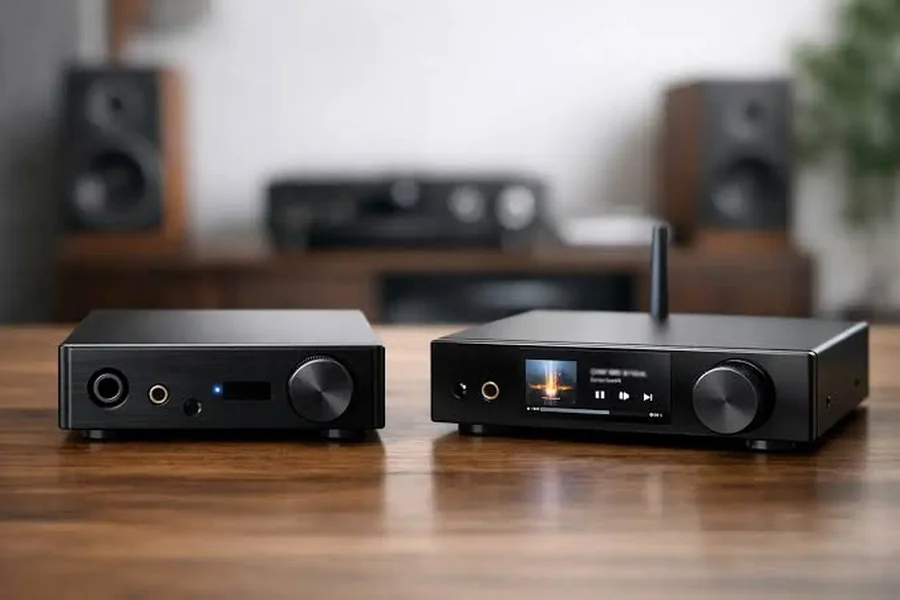
The difference between external DAC and built-in DAC is where digital audio is converted into an analog signal. An audio device such as a computer, cell phone, amplifier, receiver, etc. already has a built-in DAC. An external DAC is an additional device placed in between the digital source and your amplifier or headphones. Both can be used to yield high-quality sound. The difference is related to the DAC quality, implementation, power supply, etc., electrical noise, output stage, and the rest of the audio system. Many listeners are perfectly happy with a good built-in DAC.
What Is a DAC And Why Does It Matter?
Digital to Analog Converter is referred to as DAC. It is also integral to virtually all modern audio systems.
Digital music is music that is stored on a computer, a phone, a streamer, a CD player or a game console. Your speakers and headphones, however, need an analog electrical signal to create sound. The DAC is used to convert from one form to another.
A basic sound path could be something like this:
Digital music → DAC (digital to analog) to analog signal → amplifier to speakers or headphones.
If the audio output from any digital audio device is analog, it requires some type of DAC. Any laptop will have one. Your cell phone has one. One of them exists on a network streamer. It is typically found with an integrated amplifier having digital inputs.
The question isn’t whether there’s a DAC, because there is. The critical question is the design of the DAC and its associated circuit.
The DAC chip is just one component of the system. Performance can be influenced by the analog output stage, power supply, clocking, circuit layout, shielding and connectors.
Therefore two devices with similar DAC chips can exhibit different performance.
External DAC vs Built-In DAC: What Is The Difference?
The simplest difference is physical and functional.
A built-in DAC is embedded in a different audio equipment. It could be in your motherboard, AV receiver, integrated amp, CD player, sound card, or streaming device.
An external DAC is a dedicated DAC unit. It is connected to a digital source via a USB, optical or coaxial connection. The analog signal is then converted to a digital signal by the DAC and sent to an amplifier or active speakers.
A quick comparison is the following:
| Feature | Built-In DAC | External DAC |
| Location | Inside another device | Separate component |
| Setup | Usually simple | Requires additional connections |
| Cost | Included with the device | Separate purchase |
| Upgradeability | Often limited | Easy to replace or upgrade |
| Noise control | Depends on host device | Can have better isolation |
| Connections | Depends on host device | Often offers several inputs |
| Power supply | Shared with host device | Dedicated power supply |
| Space | Takes little space | Requires extra space |
| Sound quality | Can be excellent | Can be excellent |
| Best for | Simple systems | Flexible or upgradeable systems |
This isn’t a guarantee that an external DAC will sound better.
Built-in DACs can perform better than poorly-designed external DACs. Similarly, an external DAC can be helpful whenever the current DAC has some restrictions.
It is the quality of the implementation that is more important than the DAC being internal or external.
When Can An External DAC Make A Difference?
In certain cases, a difference that is noticeable can be made with an external DAC. It’s best when you’re unable to use the existing audio equipment because of a technical issue or you require connections and features that the equipment doesn’t support.
1. Your Current DAC Has Audible Noise
Electrical noise may be produced in the analog output by some computers and other equipment.
- While enjoying the music through sensitive headphones
- Buzzing or humming
- Electrical interference
- Unusual noise that varies with the CPU or graphics card’s operation
- Ground-loop-related sounds
These problems can sometimes be alleviated by an external DAC as the conversion and analog circuits are physically removed from the noise within the computer.
It is essential to first determine the exact cause of noise, however. A DAC is not a solution for all “hum and buzzes.
2. You Need Better Headphone Output
A DAC does not necessarily have to be a headphone amplifier.
Numerous external DAC products come with a headphone amplifier. This will come in handy if your headphones require more power than the onboard output.
In this instance, you could be improving more than the digital-to-analog conversion. You may also be receiving a more sophisticated and improved headphone output stage.
This might be more significant than changing the DAC chip, depending on the demanding headphones.
3. You Need More Digital Inputs
An external DAC can offer a couple of additional options for connections.
For instance, you can hook up:
- A computer via the USB port.
- A TV via optical means.
- A CD transport via coaxial cable.
- A streamer that runs in another digital stream.
This can be used to make the DAC the point for the conversion in the small stereo system.
4. You Want an Upgrade Path
A stand-alone DAC is less difficult to replace than a built-in DAC.
Let’s assume that you have an integrated amplifier that has digital inputs. It can have a very good internal DAC but it’s not possible to substitute that part.
When using an external DAC, you can upgrade the DAC without replacing the amplifier.
It’s a modular system that can be beneficial for those who like to build their sound systems step by step.
When Is A Built-In DAC Already Good Enough?
However, for many listeners, the built-in DAC doesn’t pose a problem whatsoever.
High-quality digital-to-analog conversion can be part of the modern audio equipment. If your system is already sounding quite clean, and there are no connection or feature limits, it’s possible that the external DAC won’t make a noticeable difference.
This is particularly true when using normal consumer equipment in a normal room to hear.
There’s also, of course, a very real consideration that isn’t always mentioned. The DAC is only one part of the complete audio chain.
Some of the things that go into your overall experience are:
- Speaker or headphone quality
- Speaker placement
- Room acoustics
- Amplifier performance
- Recording quality
- Listening volume
- Source material
- Personal hearing
In a speaker-based setup, speaker positioning and/or room acoustics can sometimes make a much more practical difference than switching from one decent DAC to another.
The simplicity is another benefit of a built-in DAC. The fewer components, the fewer cables, less power supply, and fewer potential connection issues.
If you already have the digital inputs you need on your amplifier, it may be the easiest option to use its built-in DAC.
DAC Specifications: What Should You Look At?
Specifications can be useful for comparing external DACs with built-in DACs. However, they should not be looked at individually.
Bit Depth and Sample Rate
The specifications 24-bit/192 kHz or more are common.
Bit depth is a characteristic of the dynamic range of a digital representation, and sample rate is a characteristic of how often the analog waveform is sampled.
The higher the number the better the sound isn’t necessarily. Numerous popular formats are already supported by today’s DACs.
The compatibility is typically more significant than getting the biggest specification.
Signal-to-Noise Ratio
The SNR (or signal-to-noise ratio) is a measure of the ratio of desired signal to noise.
The higher the SNR the lower the noise.
Total Harmonic Distortion
The amount of unwanted harmonic distortion added by the device is known as THD.
Generally, the lower the distortion, the better, especially if side by side comparisons are being made with technically good equipment.
Output Level and Impedance
These specifications are important since the DAC must function correctly with the amplifier or headphone amplifier immediately following it.
If you are using a line level stereo system you need a DAC with the appropriate output level and output impedance.
Connectivity
Consider the actual use of your system.
USB may be useful for a computer. It’s convenient for a TV to be optical. For a CD transport or streamer, coaxial is another option that might work.
While a technically impressive DAC is important, it’s not very useful if it does not have the necessary connections you need.
How To Decide Between An External And Built-In DAC
The simplest approach to making the decision is to begin with a real problem, not to presume that an external DAC is a better option that an internal one.
Here are some questions to ask yourself:
Does my current system produce unwanted noise?
If it is, find out where it is coming from. If the internal audio circuitry is to blame, an external DAC could be of assistance.
Do I need additional digital inputs?
An external DAC will give some flexibility if you need to connect multiple digital sources together.
Do my headphones need a better amplifier?
If you do, then think of a DAC/headphones amp component pair instead of just the DAC.
Is my current DAC technically inadequate?
Outdated or inadequate equipment may have drawbacks that can be overcome by an external contemporary unit.
Am I expecting a dramatic sound improvement?
Keep expectations realistic. Some systems may even fail to detect any difference between competent DACs, and a good DAC upgrade might only cause a slight change.
Would another upgrade have a larger impact?
Other crucial aspects to consider are room treatment, speaker positioning, speakers and subwoofer integration in the case of speaker systems.
One useful method is to compare the equipment in a controlled environment. Match their output to each other and change the source without knowing what is playing, if possible. If there are small differences in volume, one may appear to be the better option.
Final Thoughts
There is no clear answer as to which type of DAC is better, external or built-in. Both methods can provide a good digital audio.
A built in DAC may be more appropriate if you are going for simplicity, your current equipment already sounds clear, and you don’t require extra connections or bells and whistles.
A more interesting external DAC is when there’s audible noise, more inputs, a dedicated headphone amp, or a modular setup that lets you upgrade the DAC separately from the other parts.
The first thing to keep in mind is not to have a preconceived idea about a DAC based on its location or the type of DAC it is. All of this is important in good circuit design, power management, analog output stages, connectivity and system compatibility.

1 Comments